As a supplier specializing in long-wave infrared (LWIR) uncooled 640 thermal cameras, I’ve spent thousands of hours troubleshooting issues that pop up in both new units from our production line and customer devices in the field. These cameras, which use a 640×512 microbolometer array to detect thermal radiation between 8–14 μm, are workhorses for predictive maintenance, industrial inspection, search and rescue, and even agricultural monitoring—but like any sensitive optical-electronic device, they aren’t immune to performance gaps. Over the years, I’ve seen customers write in with complaints ranging from blurry images and temperature reading errors to total black screens or unstable frame rates. Most of these problems aren’t manufacturing defects; they’re often easy to fix with targeted checks, no need to send the camera back for repair. LWIR Uncooled 640
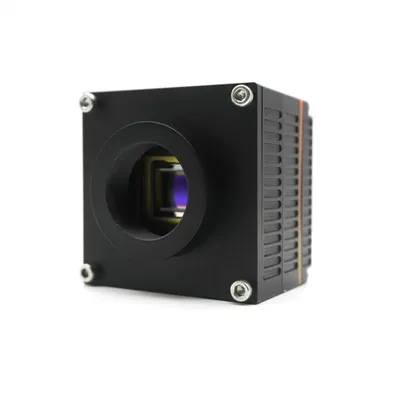
First, it’s critical to understand how uncooled LWIR 640 cameras work to frame troubleshooting steps. Unlike cooled thermal cameras that use cryogenic coolers to reduce sensor noise, uncooled microbolometers rely on temperature changes in each pixel when infrared radiation hits it. Each pixel’s resistance shifts, and the camera’s signal processing unit converts those resistance changes into a thermal image. All of this happens on a compact module, so even small disruptions to power, alignment, or calibration can throw off performance. Let’s start with the most common issue customers face: a complete or partial no-image output.
If your camera won’t display any feed, start with the simplest checks before diving into hardware. I’ve had a customer in the renewable energy sector write to me last year convinced their new 640 camera was dead, only to realize they’d plugged it into a USB port that only supplies data, not power. LWIR uncooled 640 modules draw between 5V and 12V DC, depending on the model—if you’re using an external power source, verify the voltage with a multimeter; under-voltage will cause the sensor to fail to initialize, while over-voltage can blow the on-board regulator and cause permanent damage. If power checks out, test the connection: most of our cameras use standard LVDS or USB 3.0 interfaces, but loose cables or damaged connectors are far more common failures than sensor issues. Wiggle the cable at both ends while monitoring the output—if the image flickers or cuts out, replace the cable (avoid cheap generic cables; we recommend shielded, industrial-grade cables for outdoor or high-vibration environments).
Another top complaint is blurry or unfocused thermal images. This is often misdiagnosed as a sensor defect, but it’s almost always related to lens alignment or contamination. Uncooled LWIR cameras use germanium or chalcogenide lenses, which are transparent to 8–14 μm radiation but opaque to visible light, so you can’t easily see smudges on the lens with the naked eye. If your image looks hazy or has dark spots, clean the lens gently: use a lint-free microfiber cloth designed for optical lenses, and a small amount of isopropyl alcohol (90% or higher, to avoid leaving streaks) if there’s stubborn grease. Never use paper towels, which can scratch the soft lens coating. Even with a clean lens, focus issues are common. Our 640 modules have a fixed focal length for most models, but some industrial variants have manual focus rings. If you’re using a motorized lens, check the lens driver settings—incorrect lens calibration will prevent the camera from adjusting focus properly. I recently helped a manufacturing plant troubleshoot a line of thermal inspection cameras, and their issue turned out to be a lens firmware update that hadn’t been applied; re-flashing the lens firmware (available on our customer portal for authorized users) fixed the focus drift.
Temperature reading inaccuracy is another widespread problem, and this is where calibration comes into play. Uncooled microbolometer sensors have a built-in shutter for non-uniformity correction (NUC), which aligns the response of each pixel to ensure consistent temperature readings. If your temperature readings are off by more than 1–2°C, the first step is to run a manual NUC. Most of our cameras trigger automatic NUCs every few minutes, but if the camera is in a consistent environment (no moving heat sources, stable ambient temperature), the automatic triggers might not fire, leading to pixel drift. To run a manual NUC, pause the camera, cover the lens completely with a black body or a flat, uniform-temperature surface, and trigger the correction via the camera’s software interface or hardware button. If NUC doesn’t fix the issue, check for thermal drift from the camera’s operating environment. Uncooled sensors are sensitive to their own temperature—if the camera’s enclosure isn’t properly insulated, or if it’s mounted near a hot component in your system, the sensor will drift, leading to inaccurate readings. We recommend keeping the camera’s operating temperature between -20°C and 55°C for standard models; if you need to operate in extreme cold or heat, contact our team about ruggedized variants with enhanced thermal management. Also, confirm that the emissivity setting in your camera’s software is correct: most materials have a standard emissivity (0.95 for organic materials, 0.85 for metal, for example), but if you’re measuring a material with a unique emissivity (like certain composites), adjusting this setting is critical. A customer in the aerospace sector once told me their camera was reading jet engine components 10°C too low, only to realize they’d left the emissivity set to 0.95 instead of 0.15 for polished metal.
Unstable frame rates or frequent frame drops are another common issue, and this is usually tied to processing load or interface bandwidth. LWIR 640 cameras typically output 30 fps for standard models, but if you’re overlaying thermal data with visual imagery or processing data on an external computer, your host device might not have enough bandwidth to handle both. First, check the camera’s settings: if you’ve enabled high-resolution mode or advanced image filters (like edge enhancement), that can strain the on-board signal processor. Try disabling advanced features temporarily to see if frame rates stabilize. If that works, upgrade your host’s processing power or reduce the camera’s output to 640×480 (a compatible lower resolution) if you don’t need full 640×512 detail. Also, check for background processes on your host computer—antivirus scans or other data transfers can take up bandwidth, causing the camera interface to drop frames. For cameras used in embedded systems, make sure the firmware is up to date; our engineering team releases firmware updates quarterly to fix interface compatibility issues and optimize frame rate performance. I once had a customer using our cameras in a drone inspection platform complain of constant frame drops, and updating the camera’s firmware fixed the issue because the old version didn’t support the drone’s USB 3.0 host chipset.
Sometimes, issues are harder to diagnose because they’re intermittent—one day the camera works, the next it doesn’t, or it works for a few hours then cuts out. Intermittent issues are almost always due to loose connections, environmental interference, or component fatigue. Check all internal cables and connectors inside the camera enclosure: over time, vibration from industrial use can cause ribbon cables to shift, or solder joints to crack. If you’re using the camera outdoors, electromagnetic interference (EMI) from nearby power lines or radio transmitters can disrupt the signal. To test for EMI, move the camera away from the source and see if the issue stops; if it does, upgrade to a shielded camera model or add an EMI filter to your power line. Another common intermittent issue is sensor aging: while uncooled microbolometers have a lifespan of 15–20 years, extreme temperature swings or high exposure to direct sunlight can accelerate aging, leading to pixel defects or unstable performance. If your camera is over 5 years old and experiencing frequent issues, it may be time for a sensor replacement, which our team can offer as a cost-effective alternative to a full new unit.
Now, what if none of these troubleshooting steps work? It’s important to know when to reach out for support instead of trying to fix the issue yourself. If you’ve tried power, connection, focus, NUC, and calibration checks and the problem persists, your camera may have a defective sensor, damaged circuit board, or internal component failure. As a supplier, we offer a 2-year warranty on all our LWIR uncooled 640 cameras, and our support team can help you diagnose the issue remotely with step-by-step tests to confirm if a replacement is needed.
If you’re evaluating LWIR uncooled 640 thermal cameras for your application, or you’re dealing with a persistent issue with an existing unit, our team is here to help. We provide customized configurations, on-site installation support, and ongoing maintenance for all our products. Whether you’re looking for cameras for industrial predictive maintenance, search and rescue, or agricultural monitoring, we can tailor a solution that fits your needs.
Optical Lenses & Optics References
- Rogalski, A. (2019). Uncooled infrared focal plane arrays: status and prospects. Infrared Physics & Technology, 99, 1–17.
- IEEE Standard for Terminology and Performance Testing of Uncooled Infrared Imaging Systems. (2021). IEEE Std 1858-2021.
- Gruss, B. (2020). Practical Guide to Thermal Imaging Camera Troubleshooting. SPIE Press.
Xi’an Zhongke Lead Ir-Tech Co., Ltd.
We are one of the most experienced lwir uncooled 640 manufacturers in China, specialized in providing high quality OEM products with the industrial grade. We warmly welcome you to wholesale high performance lwir uncooled 640 at an affordable price from our factory.
Address: Building 8, Hard Technology Enterprise Community No.3000, Biyuan 2nd Rd, High-Tech Zone Xi’an, Shaanxi, China
E-mail: sales@lead-ir.com
WebSite: https://www.leadinfrared.com/
